

How to Read Your Invoice
Revaly invoices are generated at the end of each billing period, typically on the last day of the month. The invoice date reflects the final day of the billing period, while the invoice is generally delivered on the first business day of the following month. Each invoice includes all activity that occurred during the billing period shown on the invoice and is due within 7 days of the invoice date.
This guide explains each section of the invoice, how your fees are calculated, and how to access, view, and download invoices from the Revaly portal.
Accessing Your Invoices
Invoices are available exclusively through the Revaly portal. Clients must log in to view and download their invoices. Once you've logged in to the client portal, follow these steps:
- Click on your name in the bottom-left corner.
- Select My Invoices from the menu.
- Find the invoice you need and click the download icon to save it to your computer.
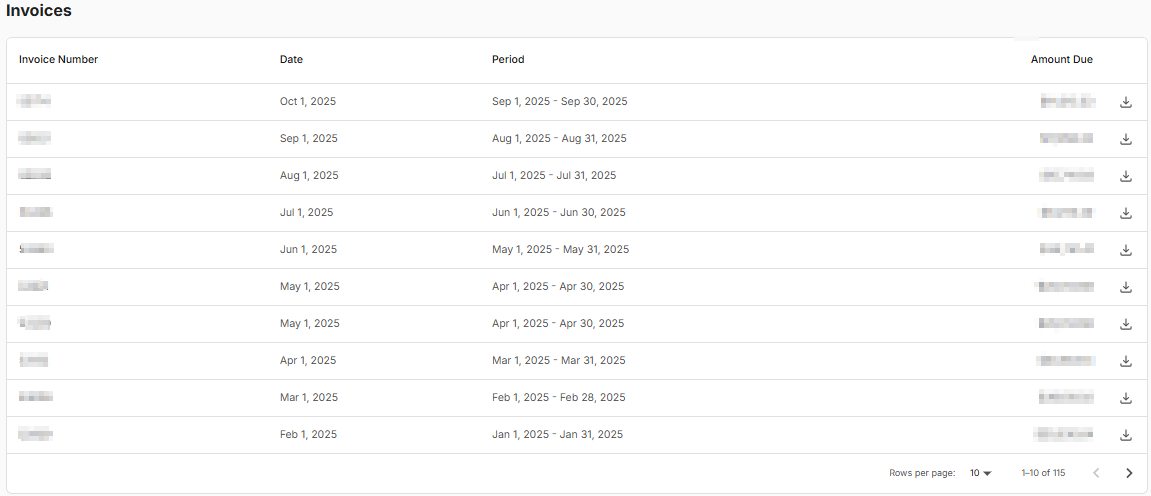
This allows you to conveniently review and manage your invoices whenever needed.
Example of a Revaly invoice:
Your invoice includes three sections: (1) Invoice header, (2) Invoice Summary, and (3) Invoice details. Keep reading to understand the terms in each section.
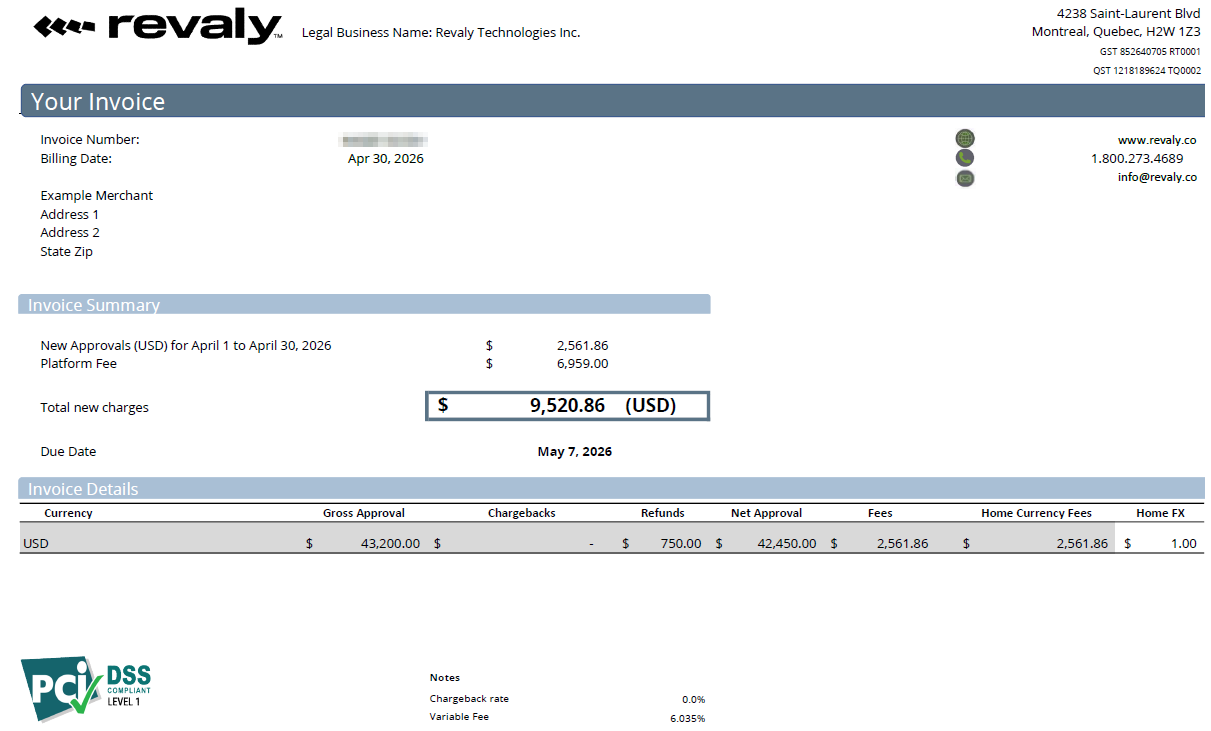
Invoice Header
- The invoice number – The Revaly internal reference number for your invoice. If you have any questions about your invoice, you can reference this number when speaking with our team.
- The billing date – The date on which the invoice is generated
Invoice Summary
- Approval Fee – The variable fee calculated based on the approved transactions processed by Revaly during the billing period, according to your agreement.
- Platform Fee – The fixed recurring fee for access to the Revaly platform and services during the billing period.
- Subtotal – The amount you are charged for Revaly recovery efforts before taxes, where applicable.
- GST/PST – Canadian taxes (only applicable to Canadian customers).
- Total New charges – The total amount due for the invoice, including taxes where applicable.
- Due date – The date by which payment must be received by Revaly.
For more details on how the current variable fee is calculated, jump to the section ‘How We Calculate Your Fees‘.
Invoice Details
- Currency – Revaly approval fees are calculated separately by currency. If you process transactions in multiple currencies, each currency will appear as a separate line item.
- Gross Approved Amount – The total value of transactions approved by Revaly during the billing period, in the native currency.
- Chargebacks – A reduction on the gross approved amount based on the agreed-upon chargeback rate.
- Refunds – The total amount of refunds that were processed within the Revaly platform during the billing period.
- Net Approved Amount – The total approved volume after chargebacks and refunds have been deducted.
- Fees – The amount Revaly charges for the net approved amount, in your native currency.
- Home Currency Fees – This is the total amount in your home currency that Revaly will be charging you.
- Home FX – The exchange rate applied to convert approval fees from the transaction currency to your home currency. All fees are converted using the exchange rate in effect on the invoice date.

How We Calculate Your Fees
Your invoice may contain a combination of fixed and variable fees, depending on the pricing terms outlined in your agreement.
Platform Fee
The Platform Fee is a fixed recurring charge for access to the Revaly platform and services. This fee is billed according to the pricing terms defined in your agreement and appears on each invoice.
Approval Fee
The Approval Fee is a variable fee based on the net approved amount processed by Revaly during the billing period. The fee is calculated using the agreed-upon approval rate and the net approved amount shown on the invoice.
Example: $42,450.00 (Net Approved Amount) × 6.035% (Approval Rate) = $2,561.86 (Approval Fee)
Refunds and any applicable chargeback adjustments are deducted before calculating the net approved amount.
Implementation Fee
New merchants will see a one-time Implementation Fee on their first invoice.
This fee covers the onboarding, configuration, testing, validation, and optimization activities required to prepare your account for production use. The Implementation Fee is charged only once and will not appear on future invoices.
Monthly Minimum Adjustment
A Monthly Minimum Adjustment may be added if the total fees for the billing period do not meet the minimum amount defined in your service agreement. When applicable, an adjustment is added to cover the difference between the calculated fees and the agreed-upon minimum.
Updated 5 months ago