

Data Gap Analysis
Identify missing payment data, understand its impact on approvals, and prioritize the improvements that can unlock stronger payment performance.
The Data Gap Analysis report helps you understand how complete your payment data is, how missing information may be limiting approval performance, and where the greatest opportunities exist to improve results. By highlighting data gaps and prioritizing them by business impact, Revaly provides a clear roadmap to strengthen approvals, unlock additional revenue, and get more value from your integration.
Why Data Completeness Matters
Every payment transaction contains information that helps issuers, gateways, and payment platforms make authorization decisions. When key data is missing, Revaly can still process transactions and deliver value, but some optimization capabilities become less effective. Missing fields may reduce approval performance, limit the effectiveness of certain treatments, and decrease the amount of insight available for future recommendations.
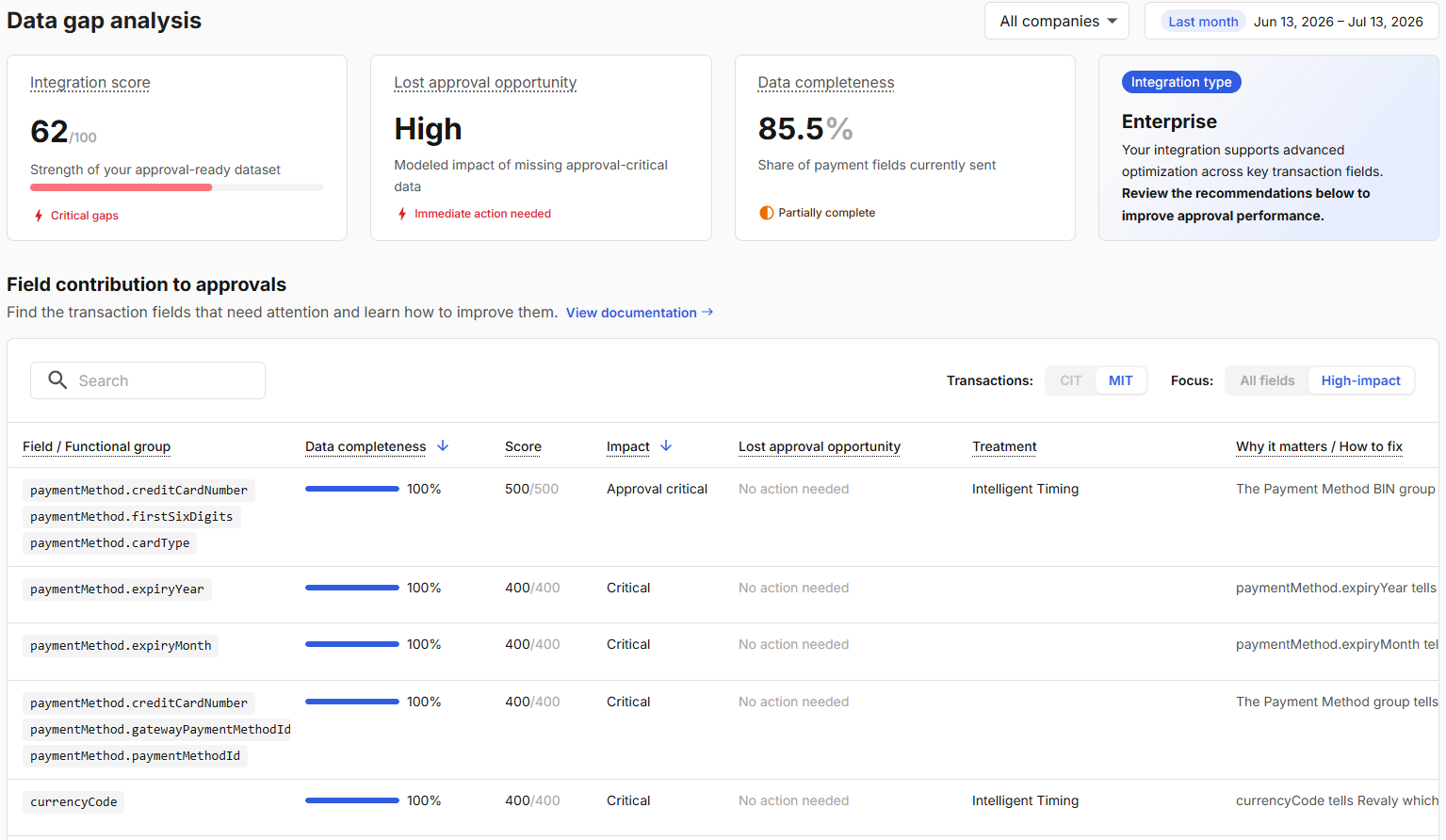
The Data Gap Analysis report makes these opportunities visible by showing:
- How complete your payment data is
- Which fields are missing or underutilized
- Which gaps have the greatest impact on approval performance
- What actions can improve your results
You can access the report by selecting Performance → Data Gap Analysis from the left-side navigation menu in the Revaly Client Portal.
The report is divided into two sections:
- Summary metrics that provide an overall assessment of your integration.
- A detailed field analysis showing which data elements contribute most to approval performance.
Summary Metrics
The summary cards at the top of the report provide a high-level view of your data quality and optimization readiness.

Integration Score
The Integration Score is a weighted measure of how completely your integration provides the data Revaly uses to optimize approvals. Fields that have a greater influence on approval performance contribute more heavily to the score than lower-impact fields.
In addition to the overall score, the report identifies whether Critical Gaps exist within your dataset. Critical gaps indicate that one or more approval-critical fields are missing or incomplete and should be prioritized for review. These fields can be identified in the Field Contribution to Approvals section, where they are labeled according to their impact on approval performance.
Lost Approval Opportunity
It estimates how much approval performance may be limited by gaps in your transaction data. The assessment is based on modeled patterns observed across merchants with similar integration types and data profiles.
| Value | Meaning |
|---|---|
| HIGH | Immediate action recommended, gaps are likely suppressing approvals now |
| MEDIUM | Improvements available, worth addressing in the near term |
| LOW | Data is well-populated. Limited upside from further completeness improvements |
Alongside the opportunity rating, the report may display an action indicator such as Immediate Action Needed when high-impact gaps are identified. This helps prioritize improvements that may have the greatest effect on approval outcomes.
Data Completeness
It measures how consistently payment-related fields are included in the transactions sent to Revaly. More complete transaction data provides additional context that can strengthen approval optimization and improve overall payment performance.
The report may also display a status indicator, such as Partially Complete or Needs Attention, to help quickly identify whether meaningful data gaps exist.
Because even small gaps can compound across large transaction volumes, improving completeness often represents one of the simplest ways to strengthen payment performance over time.
Understanding Filters and Scope
The metrics displayed in this report are calculated using the currently selected Company, Date Range, Transaction Type, and Focus settings.
- Company determines which business entity is being analyzed.
- Date Range limits the transactions included in the calculations.
- Transaction Type filters the report by transaction category.
- Focus controls whether the report evaluates only High-Impact fields or All Fields.
Field Contribution to Approvals
The Field Contribution to Approvals section helps you identify which payment fields have the greatest influence on approval performance, how consistently they are being provided, and where data gaps may be limiting results.
TipStart with the High-Impact view to identify the opportunities most likely to influence approval performance before reviewing lower-priority fields.
If you're looking for a specific field, use the search box to quickly locate it within the report.
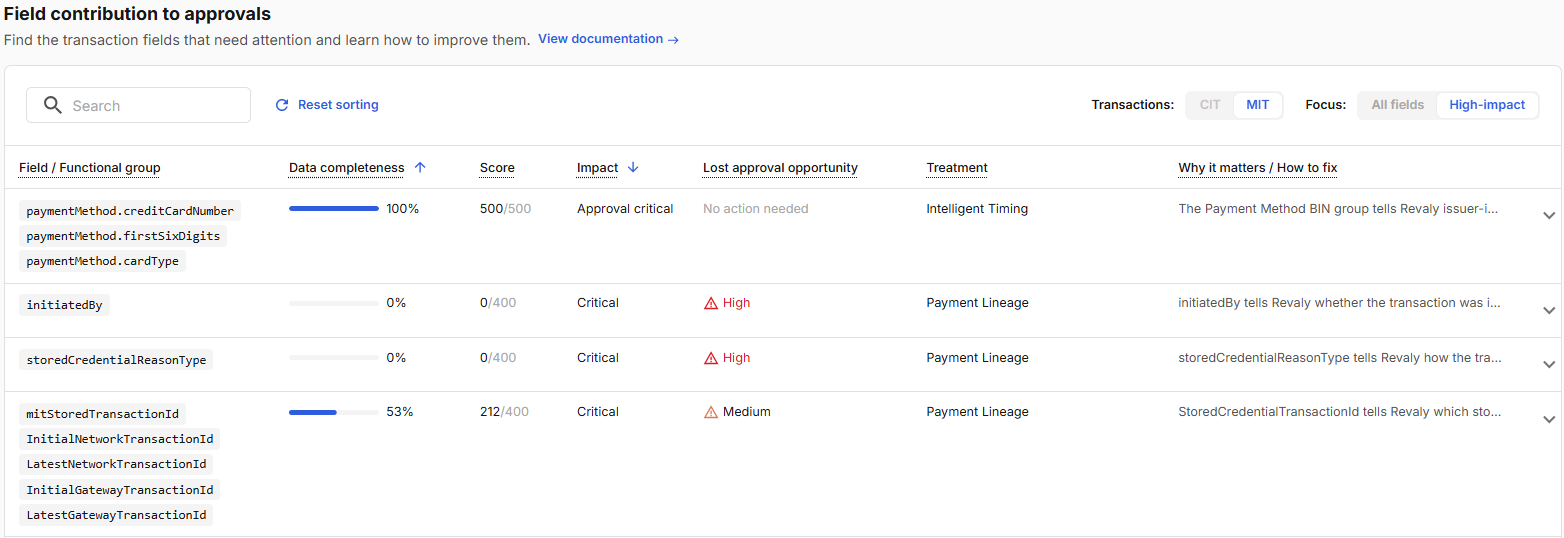
Field / Functional Group
Identifies the payment field or group of related fields that Revaly uses during approval optimization.
Some requirements can be satisfied by more than one field. When multiple fields are displayed within the same group, providing any one of them satisfies the requirement.
For example, a field group may contain several transaction identifiers that serve a similar purpose. Revaly will consider the requirement fulfilled if at least one of those identifiers is present.
Data Completeness
Shows the percentage of transactions in which the field was included in the payment data sent to Revaly.
A value of 100% indicates the field is consistently provided, while lower percentages indicate that the field is missing from a portion of transactions.
Even relatively small gaps can become significant at scale, reducing the amount of context available to optimize approvals across large transaction volumes.
Score
Represents the contribution of a field to your overall Integration Score.
The score combines two factors:
- How frequently the field is provided (Data Completeness)
- The field's relative importance to approval optimization (Impact)
Higher-impact fields contribute more heavily to the overall score, which is why improving approval-critical fields often produces the greatest increase in Integration Score.
Impact
Indicates how strongly a field contributes to approval optimization and authorization performance.
Fields are grouped into impact tiers:
- Approval Critical: Highest influence on approval outcomes and should be prioritized first.
- Critical: Very important to approval performance and should be addressed before lower-impact fields.
- High: Significant contributor to optimization effectiveness.
- Medium: Useful for improving performance after higher-priority gaps have been addressed.
- Low: Minimal contribution to approval performance. Address last.
When reviewing opportunities, focus first on Approval Critical and Critical fields with low completeness or elevated Lost Approval Opportunity indicators.
Lost Approval Opportunity
Estimates how much a missing or incomplete field may be limiting approval performance.
Opportunity indicators such as High, Medium, or No Action Needed help prioritize which gaps deserve immediate attention. These indicators are based on modeled patterns observed across merchants with similar payment profiles and integration types.
Lost Approval Opportunity is a directional indicator and should not be interpreted as a guaranteed approval lift.
Treatment
Shows which Revaly optimization capability uses the field. Examples may include:
- Intelligent Timing
- Payment Lineage
- Adaptive AVS Logic
Some fields may support multiple treatments, making them valuable across several areas of approval optimization.
Why It Matters / How to Fix
Provides a business explanation of why the field contributes to approval performance and what actions can be taken to improve data completeness.
Expand any row to view the full explanation, including guidance on resolving gaps and links to the relevant integration documentation when available.
Updated 3 months ago