

Enterprise
Integrating Revaly into your payment flow to improve authorization outcomes and payment performance
Introduction
The purpose of this document is to guide you through the steps required to integrate your CRM with Revaly’s payment performance platform. With the Enterprise Integration, Revaly operates as an intermediary layer between your system of record and your payment gateway, optimizing authorization decisions across all payment attempts, including customer-initiated payments, rebills, and retries.
Revaly applies a set of approval-optimizing treatments across the full payment lifecycle to reduce failed payments, increase approval rates, and minimize involuntary churn. These treatments operate at different stages of the payment flow:
- Pre-authorization treatments improve the quality and structure of payment requests before they are submitted to the gateway.
- Post-authorization treatments focus on efficiently and silently reattempting failed payments using intelligent timing and adaptive logic.
- Outreach treatments engage customers directly through email and SMS when automated retries are no longer recommended, using campaigns informed by behavioral science.
Together, these treatments form a unified optimization layer that improves payment outcomes while preserving a seamless customer experience.
To support this model, your integration must adjust how payment attempts are routed and how retries are executed.
The following changes are required.
Route all payment attempts through Revaly
All payment attempts must be sent to Revaly instead of directly to the payment gateway. This includes customer-initiated payments, recurring rebills, and retries of failed transactions. Revaly acts as the decisioning and orchestration layer, applying optimization logic before forwarding the payment to the gateway.
Execute retries based on Revaly instructions
When a payment attempt is not approved, Revaly may return retry instructions in its API response, including a recommended retry date and time. Your system must be able to persist this information and schedule the retry accordingly. All retries must be initiated through Revaly; no independent or gateway-level retry logic should be applied.
Requirements
To integrate with Revaly’s Enterprise API, you will need the following:
- An active Revaly production account
- At least one Company configured in the account (a default Company is created automatically)
- One or more payment gateways configured for each Company
- Production API keys generated for each Company
Process Flow
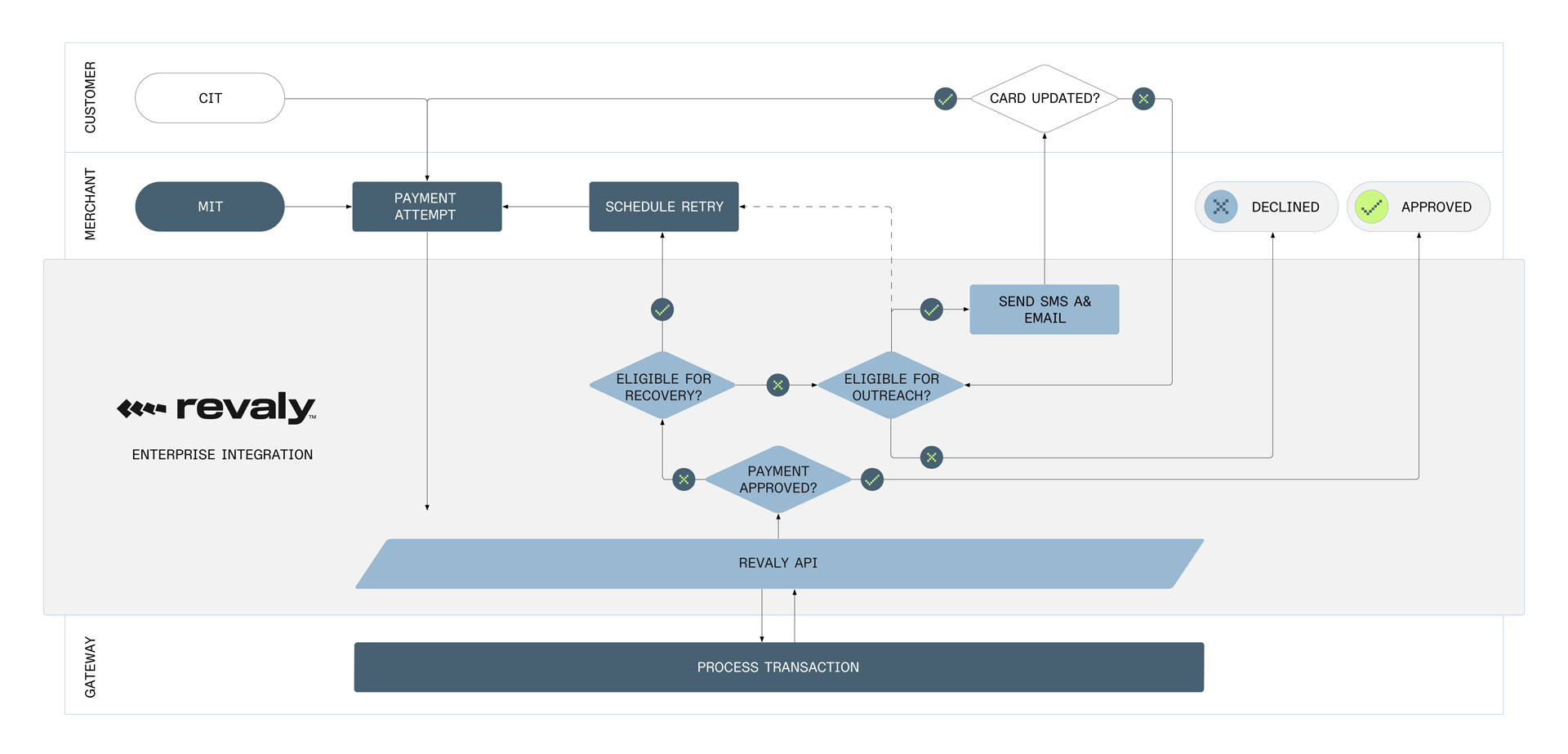
Customer Initiated Transactions
- The customer initiates a payment (CIT) through the merchant’s checkout or payment flow.
- The merchant submits the payment to Revaly’s Payments endpoint.
- Revaly evaluates the payment details and applies applicable treatments, then forwards the payment to the payment gateway.
- The gateway processes the transaction and returns a response to Revaly.
- Revaly returns the authorization result to the merchant in real time.
- If the transaction is approved, the payment is completed successfully.
- If the transaction is declined, no automated retry scheduling is performed as part of the CIT flow. The merchant determines the next customer-facing action.
Merchant Initiated Transactions
- The merchant initiates a rebill (MIT) attempt from the CRM and submits the payment to Revaly’s Payments endpoint.
- Revaly evaluates the payment details and applies treatments as applicable, then forwards the payment to the payment gateway.
- The gateway processes the transaction and returns a response to Revaly.
- If the payment is not approved and a retry is recommended, Revaly includes a retryDate in the response representing the date and time with the highest likelihood of approval
- The merchant schedules the retry for the date and time provided by Revaly (UTC).
- At the scheduled time, the CRM submits the retry through Revaly.
- If the payment cannot be approved through Intelligent Timing (for example, retry limits are reached, or a hard decline is received), Revaly evaluates whether the transaction is eligible for Outreach.
- If eligible, Revaly initiates Outreach by sending email and/or SMS messages to the customer based on a predefined campaign. Revaly returns a retryDate several days or weeks in the future to allow the campaign to run.
- If the customer updates their payment details through Outreach, a new payment attempt is triggered and processed through Revaly. The response is returned to the merchant.
- If the transaction is not approved through the Outreach campaign, the merchant triggers the final retry. Revaly returns a hard decline to indicate the end of the approval process.
Merchant Initiated Transactions (ex. Outreach)
- The merchant initiates a rebill (MIT) attempt from the CRM and submits the payment to Revaly’s Payments endpoint.
- Revaly evaluates the payment details and applies treatments as applicable, then forwards the payment to the configured payment gateway.
- The gateway processes the transaction and returns a response to Revaly.
- If the payment is not approved and a retry is recommended, Revaly includes a retryDate in the response representing the date and time with the highest likelihood of approval
- The merchant schedules the retry for the date and time provided by Revaly (UTC).
- At the scheduled time, the CRM submits the retry through Revaly
The process continues until there is a successful recovery, a hard decline, or Revaly no longer considers the transaction recoverable.
Building your Integration
Before sending any transactions to Revaly, a payment gateway must be configured under a Company. The gateway configuration includes the merchant account credentials required for Revaly to connect to the gateway on your behalf.
Gateways can be created through the Revaly client portal. Learn more here.
Once gateways are configured, your integration will primarily interact with Revaly’s Enterprise API through the Payments endpoint. This endpoint is used to submit payment attempts to Revaly, including customer-initiated payments, rebills, and retries. Revaly evaluates each payment attempt and applies a sequence of treatments designed to increase the likelihood of approval before forwarding the transaction to the payment gateway.
Additional endpoints, such as Refund and Void, are also available for managing post-authorization payment actions.
The following sections describe these endpoints and their usage in more detail.
Payments
API Reference: Payments Request
Your primary interaction with Revaly is through the Payments endpoint. All payment attempts, including customer-initiated payments, rebills, and retries, must be submitted to this endpoint.
When Revaly receives a Payments request, it evaluates the transaction and applies approval-optimizing treatments before forwarding the payment to the configured gateway. These treatments may be applied before authorization, after an unsuccessful attempt, or across multiple attempts, depending on the transaction outcome. The gateway response code and message, along with the request details you provided, are analyzed and returned to your system in real time.
You can expect the response time to be comparable to a direct gateway transaction, typically with only a few hundred milliseconds of additional latency.
If a payment attempt is not approved and a retry is recommended, the response will include a retry date and time. Your system is expected to persist this information, schedule the retry, and submit the next attempt through the Payments endpoint at the specified time. If no retry is recommended, the response code and message will indicate the final outcome.
Method: POST
URL: https://api.revaly.co/payments
Refer to the API reference documentation for detailed instructions on payload structure and field definitions. While the endpoint supports a large number of fields, only a subset is required. Some fields are especially important, as they enable Revaly’s treatment engine to make effective approval decisions, while others are optional and may assist with reconciliation or reporting. Required fields may vary depending on the payment method used. For example, certain fields are mandatory for credit card transactions but may not be required when submitting a payment gateway token, and vice versa. The sections below highlight the most critical fields to prioritize based on the payment method.
Required Fields
Required fields may vary depending on the payment method used. For example, certain fields are mandatory for credit card transactions but may not be required when submitting a payment gateway token, and vice versa. The sections below highlight the most critical fields to prioritize based on the payment method.
Although recovery.retryCount and recovery.paymentReferenceData are not strictly required for the API to accept a request, they are included in this section because they are essential for correct retry handling and are expected in most integrations.
For Credit Card Transactions
- merchantTransactionId
- orderId
- amount
- currencyCode
- customerId or email or subscriptionId
- paymentMethodType
- paymentMethod.creditCard.number
- paymentMethod.creditCard.expiryMonth
- paymentMethod.creditCard.expiryYear
- paymentMethod.fullName OR paymentMethod.firstName AND paymentMethod.lastName
- paymentMethod.merchantAccountReferenceId OR gatewayRoutingId
- recovery.retryCount
- recovery.paymentReferenceData
For Gateway Payment Token Transactions
- merchantTransactionId
- orderId
- amount
- currencyCode
- customerId or email or subscriptionId
- paymentMethodType
- paymentMethod.gatewayPaymentMethod.gatewayPaymentMethodId
- paymentMethod.merchantAccountReferenceId
- recovery.retryCount
- recovery.paymentReferenceData
Highly Recommended Fields
The following fields are not required by the API definition, and Revaly can operate without them. However, they are recommended. If these fields are available, please ensure they are included in your request.
- issuerIdentificationNumber
- paymentMethod.billingAddress
- mitStoredTransactionId
- paymentPlanData.billingPlan
- paymentPlanData.billingCycle
- recovery.dateFirstAttempt
- initiatedBy
Gateway Fields
Some payment gateways support additional, gateway-specific options that are not part of Revaly’s standard payment fields. To support these variations, Revaly allows you to include gateway fields, which are optional parameters that apply only to a specific gateway.
Gateway-specific fields are nested under a key that identifies the gateway type. For example, when using Stripe Payment Intents, fields can be provided under gatewayFields.stripe_payment_intents:
"gatewayFields": {
  "stripe_payment_intents": {
    "metadata": "value",
    "statement_descriptor_suffix": "value",
    "setup_future_usage": "value",
    "customer_id": "value",
    "off_session": true
  }
}
Fields defined under a given gateway type are applied only when the payment is routed to that gateway. If a gateway-specific field is included for a gateway that does not support it, the field is ignored and does not affect processing.
This allows you to pass gateway-specific options when required without changing your core integration logic.
Outreach Fields
If Outreach is enabled as part of your integration, additional fields are required to support customer messaging and campaign execution. These fields allow Revaly to identify the customer, select the appropriate communication channels, and deliver Outreach messages when retry-based optimization is no longer recommended.
- recovery.customerAccountNumber
- recovery.customerBalance
- recovery.disableSMSNotification
- recovery.disableEmailNotification
- paymentMethod.email (if sending email outreaches)
- paymentMethod.billingAddress.phoneNumber (if sending SMS outreaches)
Example Payment Requests
{
  "paymentMethod": {
    "creditCard": {
      "number": "4000000000009995",
      "expiryMonth": "12",
      "expiryYear": "2026"
    },
    "billingAddress": {
      "address1": "123 Main St",
      "city": "New York",
      "state": "NY",
      "zip": "10001",
      "country": "US"
    },
    "fullName": "John Doe",
    "email": "[email protected]",
    "merchantAccountReferenceId": "stripePI"
  },
  "paymentMethodType": "creditCard",
  "initiatedBy": "MIT",
  "merchantTransactionId": "trax_0023198506",
  "orderId": "order_67890",
  "customerId": "cus_98063",
  "amount": 1999,
  "currency": "USD",
  "mitStoredTransactionId": "MT03190947",
  "paymentPlanData": {
    "billingPlan": "monthly",
    "billingCycle": 6
  }
}
{
"response": {
"errorCode": "insufficient_funds",
"errorDetail": "Your card has insufficient funds."
},
"transactionId": "06DV7P33NM00002A0028DPWXABHDC",
"transactionDate": "2026-01-12T20:14:21.613Z",
"transactionStatus": 2,
"message": "The card has been declined due to insufficient funds.",
"responseCode": "20023",
"transactionType": "Charge",
"merchantTransactionId": "trax_0023198507",
"customerId": "cus_98063",
"gatewayRoutingId": "KLEZF3J7ORIE5D3RAGECKWYHVM",
"currency": "USD",
"amount": 1999,
"gatewayType": "stripe_payment_intents",
"gatewayTransactionId": "ch_3SorVKGDZrL0TUCj0TqYYLYz",
"retryDate": "2026-01-13T13:00:00Z",
"mitStoredTransactionId": "MT03190947",
"orderId": "order_67890",
"engagedRecoveryState": 0,
"paymentPlanData": {
"billingPlan": "monthly",
"billingCycle": 6
},
"recovery": {
"disableCustomerRecovery": false,
"retryCount": 0,
"paymentReferenceData": "WAABADQcaywXUt4IUsmS7T90UE6PcQGIJVsHq4bbnVLi1koAAAABm7PYY60=",
"dateFirstAttempt": "2026-01-12T20:14:21.613Z"
},
"paymentMethod": {
"paymentMethodId": "PL7HP5FPFIIENFW6AGN3HWDDVU",
"creditCardNumber": "400000******9995",
"expiryMonth": "12",
"expiryYear": "2026",
"cvv": "",
"fullName": "JOHN DOE",
"customerId": "cus_98063",
"billingAddress": {
"address1": "123 MAIN ST",
"city": "NEW YORK",
"state": "NY",
"zip": "10001",
"country": "US"
},
"shippingAddress": {},
"email": "[email protected]",
"paymentMethodType": "CreditCard",
"lastFourDigits": "9995",
"firstSixDigits": "400000",
"cardType": "VISA",
"dateCreated": "2026-01-12T20:14:21.613Z",
"storageState": "Cached",
"bin": "400000"
}
}{
"paymentMethod": {
"creditCard": {
"number": "4000000000009995",
"expiryMonth": "12",
"expiryYear": "2026"
},
"billingAddress": {
"address1": "123 Main St",
"city": "New York",
"state": "NY",
"zip": "10001",
"country": "US"
},
"fullName": "John Doe",
"email": "[email protected]",
"merchantAccountReferenceId": "stripePI"
},
"paymentMethodType": "creditCard",
"initiatedBy": "MIT",
"merchantTransactionId": "trax_0023198506",
"orderId": "order_67890",
"customerId": "cus_98063",
"amount": 1999,
"currency": "USD",
"mitStoredTransactionId": "MT03190947",
"paymentPlanData": {
"billingPlan": "monthly",
"billingCycle": 6
},
"recovery": {
"retryCount": 1,
"paymentReferenceData": "WAABADQcaywXUt4IUsmS7T90UE6PcQGIJVsHq4bbnVLi1koAAAABm7PYY60="
}
}{
"response": {
"errorCode": "insufficient_funds",
"errorDetail": "Your card has insufficient funds."
},
"transactionId": "06DV7PTNX800002A002DA8B12C7M0",
"transactionDate": "2026-01-12T20:17:34.698Z",
"transactionStatus": 2,
"message": "The card has been declined due to insufficient funds.",
"responseCode": "20023",
"transactionType": "Charge",
"merchantTransactionId": "trax_0023198508",
"customerId": "cus_98063",
"gatewayRoutingId": "KLEZF3J7ORIE5D3RAGECKWYHVM",
"currency": "USD",
"amount": 1999,
"gatewayType": "stripe_payment_intents",
"gatewayTransactionId": "ch_3SorYRGDZrL0TUCj0XaL57hA",
"retryDate": "2026-01-13T12:00:00Z",
"mitStoredTransactionId": "MT03190947",
"orderId": "order_67890",
"engagedRecoveryState": 0,
"paymentPlanData": {
"billingPlan": "monthly",
"billingCycle": 6
},
"recovery": {
"disableCustomerRecovery": false,
"retryCount": 1,
"paymentReferenceData": "WAACADQcaywXUt4IUsmS7T90UE6PcQGIJVsHq4bbnVLi1koAAAABm7PYY60=",
"dateFirstAttempt": "2026-01-12T20:14:21.613Z"
},
"paymentMethod": {
"paymentMethodId": "ZGIKOODGJCEEFD3QAGN3HW2V7I",
"creditCardNumber": "400000******9995",
"expiryMonth": "12",
"expiryYear": "2026",
"cvv": "",
"fullName": "JOHN DOE",
"customerId": "cus_98063",
"billingAddress": {
"address1": "123 MAIN ST",
"city": "NEW YORK",
"state": "NY",
"zip": "10001",
"country": "US"
},
"shippingAddress": {},
"email": "[email protected]",
"paymentMethodType": "CreditCard",
"lastFourDigits": "9995",
"firstSixDigits": "400000",
"cardType": "VISA",
"dateCreated": "2026-01-12T20:17:34.714Z",
"storageState": "Cached",
"bin": "400000"
}
}The CRM must capture and process the response based on the responseCode field.
Approved Transaction (Response Code: 10000): If the transaction is approved, the payment should be treated as successful and the subscription or account should remain (or be returned to) good standing. No further action is required for this payment attempt.
Soft Decline (Response Code: 20000-29999): These response codes indicate that the payment was not approved but is not a permanent failure and can be reattempted according to network rules.
- Review the retryDate returned by Revaly and schedule the next attempt accordingly.
- When submitting a retry, include the
recoveryobject in the request. Setrecovery.retryCountto 1 for the first retry and include therecovery.paymentReferenceDatareturned by Revaly. For subsequent retries, increment retryCount and always pass the latest paymentReferenceData.
Hard Decline (Response Code: 30000-49999): These response codes indicate that no further retries are recommended. At this point, you should proceed with your existing business logic for handling unsuccessful payments, such as account suspension or customer notification.
API Error (Response Code: 50000-59999): Response codes in this range indicate an issue with the request sent to Revaly. Review the request payload and correct any validation or configuration errors before retrying.
Refund
While the Refund endpoint is optional, we recommend including it in your integration to create a more comprehensive solution.
API Reference: Refund
The Refund endpoint is used to refund a previously settled payment using the Revaly transactionId. It supports both full and partial refunds, and the refund amount must be specified in the request body. Refunded amounts are returned to the customer’s original payment method.
Any gateway-specific constraints, such as time limits on when refunds can be processed (for example, refunds only allowed within 120 days of authorization), must be enforced by your CRM. When a refund request is submitted to Revaly, it is forwarded directly to the configured payment gateway for processing.
Refunds processed through Revaly are reflected as credits on your next invoice. This ensures that you are not billed for approval optimization or related charges associated with payments that were subsequently refunded.
Method: POST
URL: https://api.revaly.co/payments/refund/{transactionId}
Example:
https://api.revaly.co/payments/refund/06CQR5TMB800000G0011NCFRVY37A
{
  "merchantTransactionId": "refund_69709836",
  "amount": 2999
}
Notify
API Reference: Notify
The Notify endpoint is used to inform Revaly about business events related to Outreach and customer engagement.
The type of event being reported is specified using the required eventType field. Based on the event type, Revaly updates internal state, customer data, or campaign execution accordingly.
The Notify endpoint supports the following event types:
-
recordPayment: Used to notify Revaly that a customer has successfully completed a payment outside of Revaly’s Payments flow, for example as a result of an Outreach campaign where the payment is processed directly by the merchant. When this event is received, Revaly records the successful payment outcome and automatically stops any active Outreach campaign associated with the customer.
If your integration routes all payment attempts through Revaly’s Payments endpoint, this event is not required, as Revaly already receives and processes the payment result directly.
-
recordRefund: Used to notify Revaly that a refund has been processed outside of Revaly’s Payments flow for a payment that was originally approved by Revaly.
-
updateCustomerData: Used to update customer information relevant to Outreach, such as email address, phone number, or communication preferences (for example, SMS opt-in or opt-out).
-
endEngagedRecovery: Used to explicitly end an active Outreach campaign, such as when a subscription is cancelled or the merchant determines that no further engagement should occur.
Method: POST
URL: https://api.revaly.co/notify
Example
{
  "eventType": "recordPayment",
  "data": {
    "merchantTransactionId": "merch_txn_abc123",
    "orderID": "order_456789",
    "customerId": "customer_123",
    "amount": 2500,
    "currency": "USD",
    "customerAccountNumber": "ACC-001234",
    "disableSmsNotification": false,
    "disableEmailNotification": false
  }
}
{
"eventType": "recordRefund",
"data": {
"transactionId": "1234567890abcdef",
"merchantTransactionId": "merch_txn_abc123",
"orderID": "order_456789",
"customerId": "customer_123",
"amount": 2500,
"currency": "USD",
"customerAccountNumber": "ACC-001234",
"disableSmsNotification": false,
"disableEmailNotification": false
}
}{
"eventType": "updateCustomerData",
"data": {
"customerId": "customer_123",
"customerAccountNumber": "ACC-001234",
"disableSmsNotification": true,
"disableEmailNotification": false,
"contactInformation": {
"firstName": "Jane",
"lastName": "Smith",
"phoneNumber": "+1987654321",
"email": "[email protected]"
},
"address": {
"address1": "456 Oak Ave",
"city": "Los Angeles",
"state": "CA",
"zip": "90210",
"country": "US"
}
}
}{
"eventType": "endEngagedRecovery",
"data": {
"customerId": "customer_123"
}
}Sandbox Testing
Revaly provides a Sandbox environment that mirrors production functionality and is intended for validating your integration before going live. While no real funds are moved, the Sandbox environment is designed to closely replicate real-world payment behavior, so care should be taken when configuring and testing your account.
The Sandbox environment applies to Companies, payment gateways, and API keys. A Company can have both Production and Sandbox API keys. Sandbox API keys can only be used to submit requests to gateways configured in the Sandbox environment.
Not all payment gateways support Sandbox testing. For Sandbox-based testing, Revaly provides a dedicated gateway called Revaly Sandbox, which must be used for the testing scenarios described below.
Refer to the Sandbox Guide for detailed instructions on setting up and executing your tests.
Requirements
The requirements for Sandbox testing are similar to those outlined earlier in this guide, with the following differences:
- A Revaly Sandbox account is required instead of a production account
- A Revaly Sandbox gateway must be configured instead of a production gateway
Please work closely with your Integration Manager to ensure the appropriate Sandbox resources are provisioned.
Test Cases
At a minimum, create one test transaction for each of the scenarios outlined below. These transactions will be reviewed by the Revaly integrations team and are required for integration approval.
Be sure to record the corresponding transaction identifiers for each test scenario.
Test Case 1: Submit a Successful Initial Rebill (MIT)
Submit a rebill payment (MIT) through Revaly that is expected to be approved on the first attempt.
- The request must not include a recovery object.
- The response returns an approved status (responseCode: 10000).
- No retry scheduling is required.
Test Case 2: Schedule a Retry After a Soft Decline (Initial MIT Attempt)
Submit an initial rebill payment (MIT) through Revaly that is expected to return a response code in the 20000–29999 range. The response will include a retryDate and recovery.paymentReferenceData.
- Use the returned
retryDateto schedule the next payment attempt at the specified date and time (UTC). - When submitting the retry, include the
recovery.paymentReferenceDatareturned by Revaly in the immediately preceding response, and setrecovery.retryCountto 1 to indicate the first retry attempt
Test Case 3: Do Not Schedule a Retry After a Final Decline (Initial MIT Attempt)
Submit an initial rebill payment (MIT) through Revaly that is expected to return a response code in the 30000–49999 range.
- These responses indicate that no further retries are recommended.
- No retryDate will be returned.
- The transaction must not be scheduled for retry.
Test Case 4: Submit a Successful Retry
Submit a payment attempt that is expected to be approved with a recovery.retryCount value greater than or equal to 1.
- This validates that retries submitted through Revaly can result in an approved transaction.
- Ensure the request includes the appropriate
recoveryfields carried over from the prior response.
Test Case 5: Validate Retry Sequencing Using Reference Data and Retry Count
Simulate a sequence of related payment attempts to validate correct handling of retry state.
Transaction 1: Submit a payment that produces a soft decline.
No recoveryobject in the request
Transaction 2: Submit a retry that produces a soft decline.
recovery.retryCount= 1recovery.paymentReferenceDataequals the value returned in Transaction 1
Transaction 3: Submit a retry that produces a soft decline.
recovery.retryCount= 2recovery.paymentReferenceDataequals the value returned in Transaction 2
This sequence validates that your system correctly persists and propagates retry state across attempts.
Test Case 6: Refund a Retried and Approved Transaction
If a payment that was approved after one or more retries is later refunded, the refund must be processed through Revaly to ensure accurate billing and reporting.
Transaction 1: Submit an approved payment with recovery.retryCount greater than or equal to 1.
Transaction 2: Submit a refund request using the Revaly transactionId from Transaction 1.
Updated about 1 month ago